How To Hide Encrypted Data
Published
Imagine you are moving over a nation-state’s border. Someone finds you suspicious, and demands to search your device. You have sensitive data on that device that cannot, for whatever reason, be given to authorities. Maybe border patrol officers without security clearance demand you unlock a device with top-secret data, or perhaps after participating in a protest, your government declares you a terrorist and demands access to your phone, or maybe a country simply does this to everyone.
Whatever the reason, you may have data on a device that cannot be handed over. But, when a device is taken, it is obvious if it is encrypted or not, it’s clear if they need to extract a password from you. They know with 100% certainty there is hidden data.
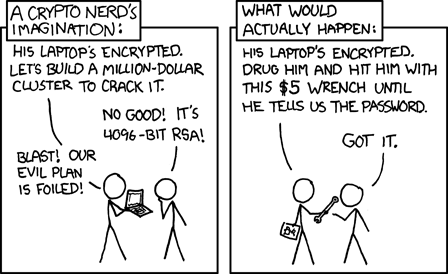
Pictured: 100% certainty of encrypted data. Source: xkcd
But what if you can get that down to 90% certain? 50% certain? Now you can argue that there is not encrypted data. If someone is not 100% certain there is data to extract, then there is a chance they will believe you when you say there is nothing to see. They can’t prove you’ve given everything up.
This is the theory behind Deniable Encryption. You gain plausible deniability for any data in an encrypted volume.
Implementing Deniable Encryption
There are a few implementations of deniable encryption. A famous one is “Rubberhose Filesystem,” a project out of Wikileaks. The name comes from the goal that it is immune to “rubberhose attacks”, named after the “tool” used in coercion and torture. Rubberhose Fs is not maintained, though. As one commenter on the Security Stackexchange put it, “There was Rubberhose FS, but the author is ‘otherwise engaged’ at this moment” (The author, Julian Assange, was in prison for Wikileaks-related activities).
There have been a few revival attempts. They all seem to be focused on being filesystems specifically.
How it Works
Existing implementations of deniable encryption use a type of stegonography, the art of hiding information from the unauthorized, in conjunction with cryptography, the art of making data difficult to read for the unauthorized.
Both of these are quite fun and filled with dramatic histories that I very much recommend reading. Try The Code Book by Simon Singh. But I digress.
One way of making something difficult to find is to make “noise.” Noise is the amount of unrelated or random information that distracts from what is truly being hidden, building the haystack around the needle.
Therefore, one way to hide encryption is to surround it with other encryption. If you encrypt a file, you can also encrypt a whole bunch of other files around it with different passwords. From the perspective of an attacker, they would have to break every single encrypted file until they find the right one.
Any idea which ones have interesting information?
Now, it is so much faster to just get you to “volunteer” which file has interesting data. Thus the wrench attack, again.
But if there is a whole bunch, why don’t they just get you to give them all the passwords for all the files? They can’t trust that you would tell them the right file and password.
First: a property of good encrypted data. A lot of encryption has the goal of being completely indistinguishable from random data.

Random data entropic analysis

Encrypted data entropic analysis
Random data from /dev/urandom, vs an encrypted PDF of similar size. Screenshots from the wonderful tool imHex
And you can’t really “decrypt” random data. There is nothing to show, but it looks the same as encrypted data. There is no way to prove random data isn’t encrypted, and the only way to prove it is encrypted is to give up a key that correctly decrypts it. So, we can scatter random blobs of data around our needle.
Remember that, from the attacker’s perspective, these all look identical.
If the attacker knows some of the files are entirely random, but not which ones, You can argue that any of them are random, even the encrypted ones. These decoy files are commonly called “chaff,” named after the waste product of certain plants during harvesting.
Now, we can argue any given file is chaff, but we still have one major problem: Metadata.
Metadata
Metadata is data about data. This can be a file name, size, type, anything that tells us about the file.
For example, I downloaded this photo while experimenting with different image formats and compressions: bernese-mountain-dog-cherry-blossoms. The file is named “bernese-mountain-dog-7928156.jpg,” which tells us that it is probably a dog, though it might’ve been misnamed. The file extension is “.jpg”, an image format. My computer says it is 4.6 megabytes, so it is a fairly large image, and that I downloaded it on Thursday, 20 April 2023. I also recognise the naming convention, and that’s how I rediscovered the Pixabay link. We have a lot of information about this picture before we even open it.
Similarly, an attacker could extract certain data from the files in our deniable encryption implementation.
Metadata Problem 1: The number of files gives upper and lower bounds for the number of encrypted files.
The attacker can guess with high confidence that you have at least one encrypted file. Otherwise, why would you go through the trouble? So we keep multiple encrypted files. Some we are okay with divulging the keys to, some we pretend don’t exist.
Remember that, from the attacker’s perspective, these all look identical.
The number of files also gives an attacker the maximum number of encrypted files. In our illustration, an attacker can assume there is at least one file of interest, and at most nine.
Metadata Problem 2: The size of the files may give away its contents.
In addition, the size of a file may give away its contents. We reasonably want to not waste space, so we might have a bunch of tiny chaff files, and a few large encrypted files, expecting the large number of files to throw off an attacker. But, an attacker would easily be able to suspect the larger files.
Remember that, from the attacker’s perspective, these all look identical, except for the sizes.
Ideally each file is about the same size, but we can actually make it not matter quite as much by hiding the file sizes. Your computer almost certainly does not have a way to do this normally.
Metadata Problem 3: File names are supposed to be helpful.
When you want to access your data, you shouldn’t have to attempt to decrypt several dozen files before you find the one it works on. Someone might be tempted to somehow label their encrypted files, but that can be coerced or discovered by an attacker! Ideally each file name is entirely random and has a very tiny chance of actually representing the file contents. One may be tempted to use wordlists, since word combos are easy to memorize, but it still encourages people to pick meaningful names! So we need to do it randomly and numerically.
Perhaps we can make a script that just tries a key on all files? Sure, but how do we really know if a key works? Data doesn’t really have a “look”, so we need some way to reliably identify a target file when given a decryption key.
Metadata Problem 4: We know when files are created and modified.
Your existing filesystem probably has a feature where it makes a note of when a file is created and modified. If a file is in active use, your operating system will update the modification time. This means that chaff files will necessarily have older dates, perhaps even equal to the creation date, than actively used encrypted files.
The most straightforward way is to periodically manipulate the times on the files, but this is not an automatic method.
So how do we fix these?
By taking control of all the metadata.
Taking Control
We isolate all the files into a single file that we manage ourselves, kind of like a Zip file.
We now control everything about the files, all the operating system needs to do is store this mega file. The mega file condenses all the metadata from all the smaller files into one. It all updates at once. This solves problem 4, the file date problem.
In fact, the word “file” no longer makes sense, since they are now part of one big file now. Let’s call them “layers”. Also, let’s call the mega-file a “volume.”
We should also keep an index of where all the layers are, so we can jump to the one we want.
| Layer ID | 0 | 1 | 2 | 3 | 4 | 5 | 6 | 7 | 8 | 9 | 10 | 11 | 12 |
| Position | 2 | 3 | 23 | 25 | 30 | 40 | 42 | 44 | 46 | 76 | 78 | 79 | 94 |
We can also realize that it doesn’t make much sense to distinguish between individual chaff layers anymore, since it is all a homogenous soup of randomness, and we can point to just random parts of it. Heck, we can even point to the middle of some other data, if we include the layer index as part of the decryption algorithm, so wrong layer to real data still outputs wrong data, even with a valid key! (This is a feature of the XTS mode of AES. If that makes no sense, don’t worry.)
This also means it’s not possible to determine the true size of chaff layers, partly solving problem 2, on file sizes.
| Layer ID | 0 | 1 | 2 | 3 | 4 | 5 | 6 | 7 | 8 | 9 | 10 | 11 | 12 |
| Position | ? | 3 | ? | ? | 30 | ? | ? | ? | 46 | ? | ? | 79 | ? |
Now it is just our encrypted data, positioned randomly in the volume, with random data in between.
We can also store the size of each layer encrypted alongside the data in a header, just before the data really begins. Now, there is no way to know how large a layer is, or if it even exists, without the key. This solves problem 2, on file size, completely.
You might also notice the order of the index table doesn’t actually matter. If you walk all 12 entries in the index, you will eventually find the layer a key goes to. So let’s randomize it. Make sure to update layer indexes when changing the encryption.
| Layer ID | 0 | 1 | 2 | 3 | 4 | 5 | 6 | 7 | 8 | 9 | 10 | 11 | 12 |
| Position | 46 | ? | 79 | ? | ? | ? | ? | 3 | ? | ? | 30 | ? | ? |
Now, let’s say you gave up the keys for layers 7 (red) and 2 (green). From the perspective of an attacker, the volume looks like this:
| Layer ID | 0 | 1 | 2 | 3 | 4 | 5 | 6 | 7 | 8 | 9 | 10 | 11 | 12 |
| Position | ? | ? | 79 | ? | ? | ? | ? | 3 | ? | ? | ? | ? | ? |
That’s a large chunk of nothing in the middle. Humans like to look for patterns, and don’t really “see” randomness. Sure, this arrangement is just as likely as any other, but humans don’t think like that. An attacker will assume the area before layer 7 (red) is too small for another layer, similarly with layer 2 (green).
We can resolve this by splitting layers into “fragments,” and scattering them around the volume. That way, no single area is “too small” for real data, and large unused chunks are less likely.
Which might shuffle into…
| Layer ID | 0 | 1 | 2 | 3 | 4 | 5 | 6 | 7 | 8 | 9 | 10 | 11 | 12 |
| Position | 46 | ? | 79 | ? | ? | ? | ? | 3 | ? | ? | 30 | ? | ? |
For each fragment, we will note the position of the next fragment, and the size of the fragment. If the next position is set to zero, we consider it the last fragment. We keep the “start” of the layer in the same spot, so we don’t need to update our index.
Now when you give up layers 2 and 7:
| Layer ID | 0 | 1 | 2 | 3 | 4 | 5 | 6 | 7 | 8 | 9 | 10 | 11 | 12 |
| Position | ? | ? | 79 | ? | ? | ? | ? | 3 | ? | ? | ? | ? | ? |
It doesn’t feel like as much of it is missing. This further solves problems 1 and 2, a gut feeling there is more to see is less likely.
Now let’s figure out how to tell which layer a key goes to. Yeah, up until this point, it has been entirely theoretical how we match a key to a layer.
Let’s start by generating a random 128-bit number. It doesn’t really matter what it is, but it ought to be random, because it is going to be stored unencrypted. We store it at the start of the volume, before the index.
Then, we encrypt it with each key. On chaff layers, just fill the spot with random bytes.
Random number: 0x9D7AD16976998794F5324455F8A12A04
| Index | Encrypted Number | First Fragment Position |
| 0 | 0xA2F320FE… | 46 |
| 1 | — random — | — random — |
| 2 | 0xA7D38597… | 79 |
| 3 | — random — | — random — |
| 4 | — random — | — random — |
| 5 | — random — | — random — |
| 6 | — random — | — random — |
| 7 | 0xB16AD8DA… | 3 |
| 8 | — random — | — random — |
| 9 | — random — | — random — |
| 10 | 0xD3783995… | 30 |
| 11 | — random — | — random — |
| 12 | — random — | — random — |
Now, when we want to decrypt a layer, we provide the key. Let’s say we provide the key for layer 2, green.
We give the key. A program attempts to decrypt the number on layer 0. It doesn’t match the stored number, so we continue.
Decrypt number on layer 1. It doesn’t match the stored number, so we continue.
Decrypt number on layer 2. It does match the stored number! We now know that whatever is in layer 2, this key will correctly decrypt it.
Also, since we now know both the layer and the key during decryption, we might as well encrypt the fragment position! This makes it so the position will look just as random as the chaff “positions”.
Now that every part of the index is encrypted, it looks like random data, as does everything after it. This means that if we don’t store the length of the index, there is no way to tell how many layers there are! To find a layer with a matching key, we simply need to test a “reasonable” number of headers. Remember that attempting to decrypt data with the wrong key returns junk data, so we can safely try to decrypt nonexistent layers.
When inspecting our volume, an attacker can assume there is at least one layer, and less than the “reasonable” number we picked to test. We can pick any number, no matter how many layers there truly are!
All of this does come at a cost, though. It is nearly impossible to manipulate the allocation of the layers after volume creation without full knowledge of the volume, which we specifically don’t want! If an attacker is certain we know everything about a volume, they can verifiably prove you haven’t given it up by the mere fact that they don’t know everything about the volume.
This means that layers cannot be moved reliably, layers cannot be extended, the index can not be randomized, fragment counts can’t be changed.
What an Attacker Sees
An attacker can’t know how many layers there are, since real ones are scattered among fake “chaff” ones, and there isn’t really an upper limit.
An attacker can only theorize any given layer’s size is, at most, the size of the volume, minus the size of known layers, assuming such a layer exists.
An attacker looking at file modification time would only be able to see that the volume was in use, but not which layers.
An attacker can’t guess what the contents of a given layer would be, since they are referred to by numbers, which are randomly assigned.
An attacker can’t even use a visualizer and gut feeling to find undisclosed layers!
Therefore, an attacker can’t prove you have not given up all encryption keys.
But be warned: You also can’t prove you have given up all encryption keys. Even if you have given up everything, so long as there is junk data, you can’t prove it’s not encrypted, and we need the junk data so the attacker can’t prove it either!
In some places, it is illegal to not disclose encryption keys, and their laws may contain a failsafe for deniable encryption, effectively criminalizing deniable encryption. Overall, the best way to avoid handing over data is to make sure it doesn’t exist in the first place. But, if you need the data to exist, being able to argue it doesn’t exist might be a close second.
But, even after all this, there is still one flaw, one that I am not sure how to fix. I call it the “observation attack.”
Let’s say the attacker has access to multiple copies of the volume over time.
They can load each one into a diff program and see what blocks have changed,
and which ones haven’t. Given enough changes, an attacker can compare the keys
you give up with the changes.
Imagine the attacker is able to detect changes in the following locations, but once again you only give up the keys to layers 7 (red) and 2 (green). All the attacker needs to do is compare:
The attacker can see that there are changes outside of the given data! They are certain you haven’t given up all the keys.
One might think, “Okay, we just need to periodically alter the fake data!” Yes, if you do that, you can argue you were just faking changes to any correctly guessed layer, but performing this action requires knowing where the chaff data is, which necessarily means knowing where real data isn’t, which violates our goal of the user not knowing everything, it’s the same problem with moving layers around.
Perhaps there is a way to do this with limited knowledge, but if this presents a large risk to you, you may wish to find another way to hide data, or take extra steps to prevent copies being made.
So how do we use it?
There are some filesystems that you can use. Ruberhose FS is one, though it is old. There is also Sekura, though it appears abandoned and is only for Linux.
I wanted something that could be easily added to anything, that could work with other forms of stegonography and cryptography.
And that is why LibAether exists.

LibAether (Aether Library) is named after the old theory of a volume of light that existed beyond human sight. It is designed as a small library that can be integrated anywhere for anything that needs deniable encryption. You, the user, define read and write functions, and LibAether does the rest.
The library itself is written in C, so bindings can be written for other languages.
Those read/write functions can go directly to a file, or to a block device, or read pixels from an image.
Aether uses AES-256-XTS, a NIST recommended encryption algorithm already used in full-disk encryption (like Bitlocker on Windows), though it encodes both the position and the layer index in the tweak. This solves a few problems, including making it so data isn’t encrypted in the same way at two different locations, making it so the correct layer is also required, and doubling the key size, from 256-bit to 512-bit! Also, AES-256 is considered post-quantum, strong enough to survive quantum computers. XTS also allows for random reads and writes, so the entire layer does not need to be re-encrypted to change a single byte.
It works in 128-bit blocks (that’s why we generated a 128-bit number earlier), so it is also easy to walk the index, everything is just a multiple of 128-bits.
The library handles volume creation, positioning layer fragments, randomizing the index, generating padding, and decrypting layers.
It also doesn’t care what your data looks like. As long as it correctly decrypts that 128-bit number, it will store and retrieve whatever you give it without question.
Limitations
LibAether does not perform data integrity checks. While designing the library, I did not consider integrity as part of the threat model. However, nothing is stopping you from adding your own integrity checks, whether that is through a sidecar file, or stored in the layer.
It also doesn’t (yet?) support manipulations post-allocation, like shrinking a volume or allocating new space at the end of the volume. I’d also like to add some of the theoretical fixes for the observation attack, so other developers can choose how they want to integrate it in their risk model.
We also don’t provide a key derivation function (KDF) in LibAether, so you would
need to bring your own, like argon2 of the NIST recommended pkcs12kdf. You can
include the header-only file examples/hash.h in the repository for a quick
argon2 hash function.
Also please note that this is my first time publishing a C library. I did my best to make it secure and portable, but there may be issues.
Closing Notes
Deniable encryption is interesting in both a social and technical sense. It’s about more than maths and provability, it is also about humans. We go beyond technical resistance, and also focus on social resistance, how to protect data when an attacker has access to the owner of the data.
So, I hope you found this writeup interesting or informative. This is a project I’ve been working off and on, for about a year, and I am very happy to release the first version of it.